 DuskPane
Support
Need help with DuskPane? We're here to assist.
Contact
Email us at support. We typically respond within one business day.
Common topics
Getting started
DuskPane is a one-time purchase for a recent version of macOS. Buy it on the homepage and your license key arrives by email from Lemon Squeezy, usually within a minute.
Download the app, move it to Applications, open it, and enter your key.
License keys
One license activates DuskPane on up to 3 Macs you own. Your key is in the purchase email from Lemon Squeezy, and on an activated Mac you can see it any time in DuskPane's Settings, under License.
Lost the email? Search your inbox for “Lemon Squeezy”. If it's gone, email us and we'll look up your order.
Free up a Mac
Your license covers 3 Macs. If DuskPane tells you the license is already active on 3 Macs, release one you no longer use:
- On the Mac you want to release, click the DuskPane icon in the menu bar, then click the gear to open Settings.
- Choose the License tab.
- Click “Deactivate This Mac…” and confirm.
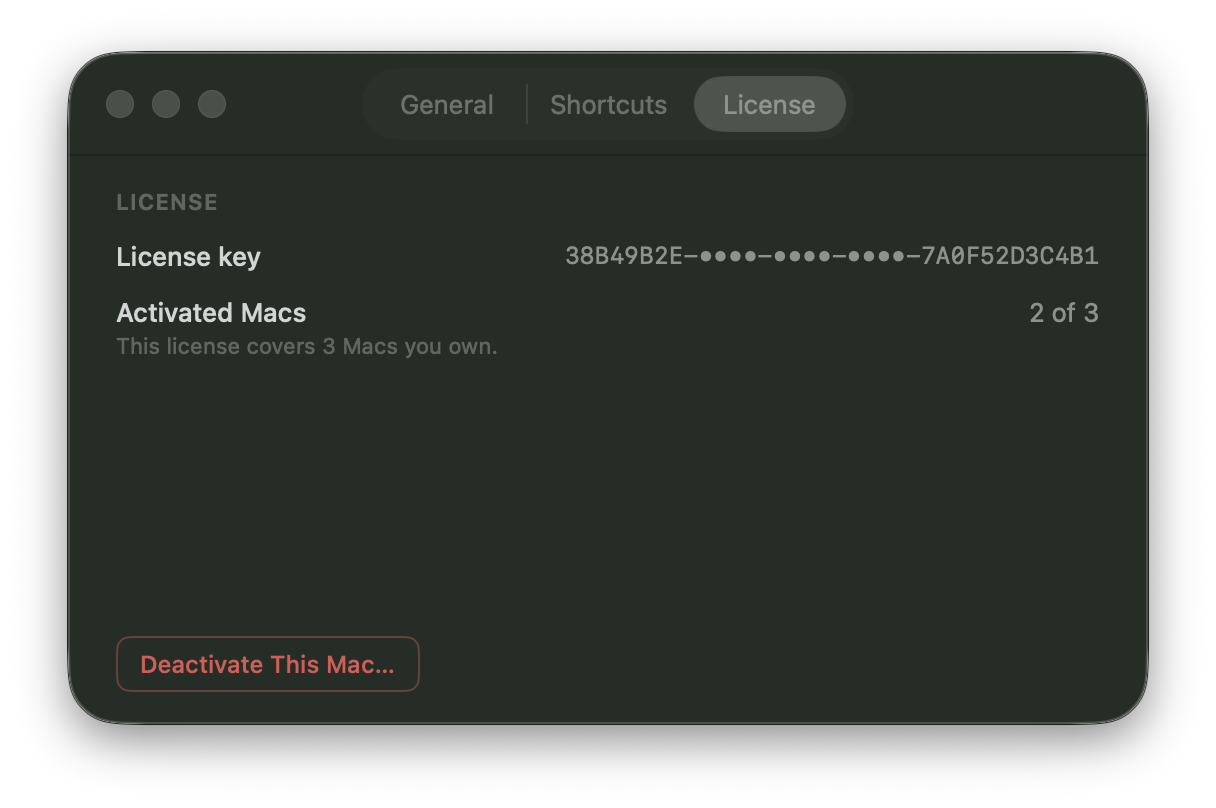
The slot frees up immediately. Back on your new Mac, enter the same license key to activate.
No longer have access to that Mac — sold, erased, or lost? Email us at support and we'll release it for you.
Permissions
DuskPane's manually placed covers work without special permissions. Focus Mode uses Accessibility to identify the active window. Attaching a cover to an app window uses Accessibility for window geometry and Screen Recording for reliable stacking order. DuskPane reads window metadata only; no screen pixels are captured or transmitted. Grant or revoke either permission in System Settings → Privacy & Security.
Refunds
Every purchase comes with a 30-day money-back guarantee. Email us within 30 days of purchase and we'll refund you in full.