 DuskPane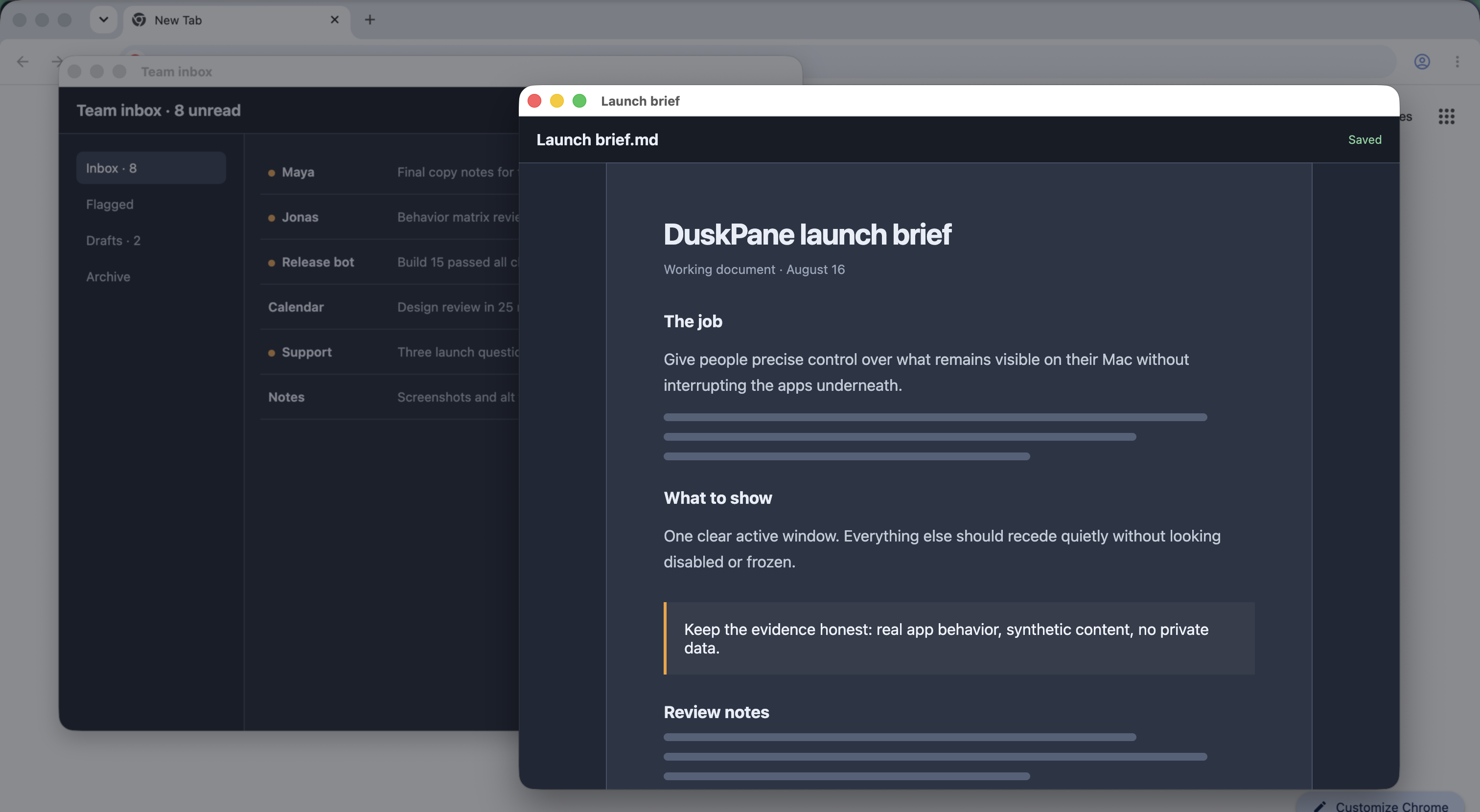
DuskPane's Focus Mode keeps the active window clear while dimming or frosting the rest of your Mac screen. When you switch supported windows, the clear area follows the window you are using.
Follow the work
How to keep only the active window clear
Focus Mode uses macOS window identity and geometry. It never needs to capture the pixels inside your windows.
-
1
Open DuskPane from the menu bar
Find Focus Mode at the top of the panel. You can also use the default Shift-Command-F shortcut from any app.
-
2
Allow Accessibility the first time
macOS asks once because DuskPane needs to identify the focused window. DuskPane reads window metadata, not the content drawn inside the window.
-
3
Choose Dim or Glass
Dim lowers the visual weight of everything else. Glass frosts it. Set the strength in DuskPane so the background recedes without disappearing.
-
4
Return to your work
Click another normal app window and DuskPane moves the shade below it. The new window becomes clear; the one you left settles back behind the veil.
-
5
Turn Focus Mode off when you are done
Use Shift-Command-F again, or open the menu-bar panel and switch the Focus Mode toggle to Off.
What follows focus
Designed for ordinary Mac windows
Focus Mode treats a visible, normal WindowServer window as the focus target. That includes the document, browser, editor, or other main window you are actively using.
- Switching appsThe newly active eligible window becomes clear after you click or switch to it.
- Overlapping windowsThe front window stays crisp while windows below it recede together.
- Minimized windowsIf the clear window disappears, DuskPane falls back to the next visible eligible window.
- Transient surfacesMenus, tooltips, and floating palettes are not selected as the main clear window.
Current multi-display limit
Focus Mode currently creates its shade on one display when you turn it on. Do not expect it to dim every monitor in a multi-display workspace. You can still place ordinary DuskPane covers where you need them.
Permissions
Accessibility, not Screen Recording
The current DuskPane Focus Mode asks for Accessibility so it can identify the focused app window and respond when focus changes. Its WindowServer check uses window IDs, order, bounds, layer, and visibility metadata.
Focus Mode does not use Screen Recording in the current release. That permission belongs to DuskPane's optional attached-cover stacking feature. Neither path records or transmits the pixels inside your screen.
If permission is denied
Focus Mode waits and does not activate until Accessibility is granted. Manually placed solid and frosted covers continue to work without Accessibility or Screen Recording.
Focus Mode or a cover?
Choose by what should stay clear
| Use | What stays clear | How it moves |
|---|---|---|
| Focus Mode | The active normal Mac window | Follows window focus automatically |
| Manual cover | Everything outside a chosen screen rectangle | Stays at the screen coordinates you set |
| Attached cover | Everything outside a cover tied to one app window | Follows the attached app's geometry |
Common questions
Before you turn on Focus Mode
Can DuskPane blur instead of dim the background?
Yes. Choose Glass in the Focus Mode controls, then adjust the blur and strength until the background has the right amount of detail.
Does Focus Mode follow me when I switch windows?
Yes, for normal visible Mac windows. The new active window becomes clear while the rest of the display stays behind the shade.
Does Focus Mode require Screen Recording?
No in the current release. It requires Accessibility to identify the focused window. DuskPane's optional attached-cover feature uses Screen Recording for reliable stacking metadata.
Will it dim all of my monitors?
Not currently. Focus Mode shades one display when it starts. Avoid relying on it as an all-monitor dimmer in a multi-display setup.
Does DuskPane read what is inside my windows?
No. Focus Mode works from window identity, order, bounds, layer, and visibility metadata. It does not capture or transmit screen pixels.